 Chemistry Poker
PLAYER HANDBOOK
How to play and understand your score
Chemistry Poker is a single-player card game about combining element cards and reaching a target in a limited number of reactions. Start with water to learn what the board tells you and how your score is calculated.
1. Select two H cards and one O
Open the free browser version and press the start button. The browser page is in Japanese: 「無料で遊ぶ」 starts the game, and 「はじめから」 on the title screen starts a new run. The introduction guides you through making water.
- Check the target and reactions left. The introduction asks for 300 points in up to four reactions. Your current score is at the top left; the reactions remaining are at the bottom right.
- Select two H cards and one O. Selected cards rise. Cards that can connect to your selection glow; a card that completes a compound glows more strongly.
- Read the notebook. It identifies H₂O, water at level 1. The “Using” line lists H × 2 and O, while “Left” shows the cards you will keep.
- Press React at the bottom right. Selecting cards does not commit the reaction. Use the clear-selection button if you want to choose again.
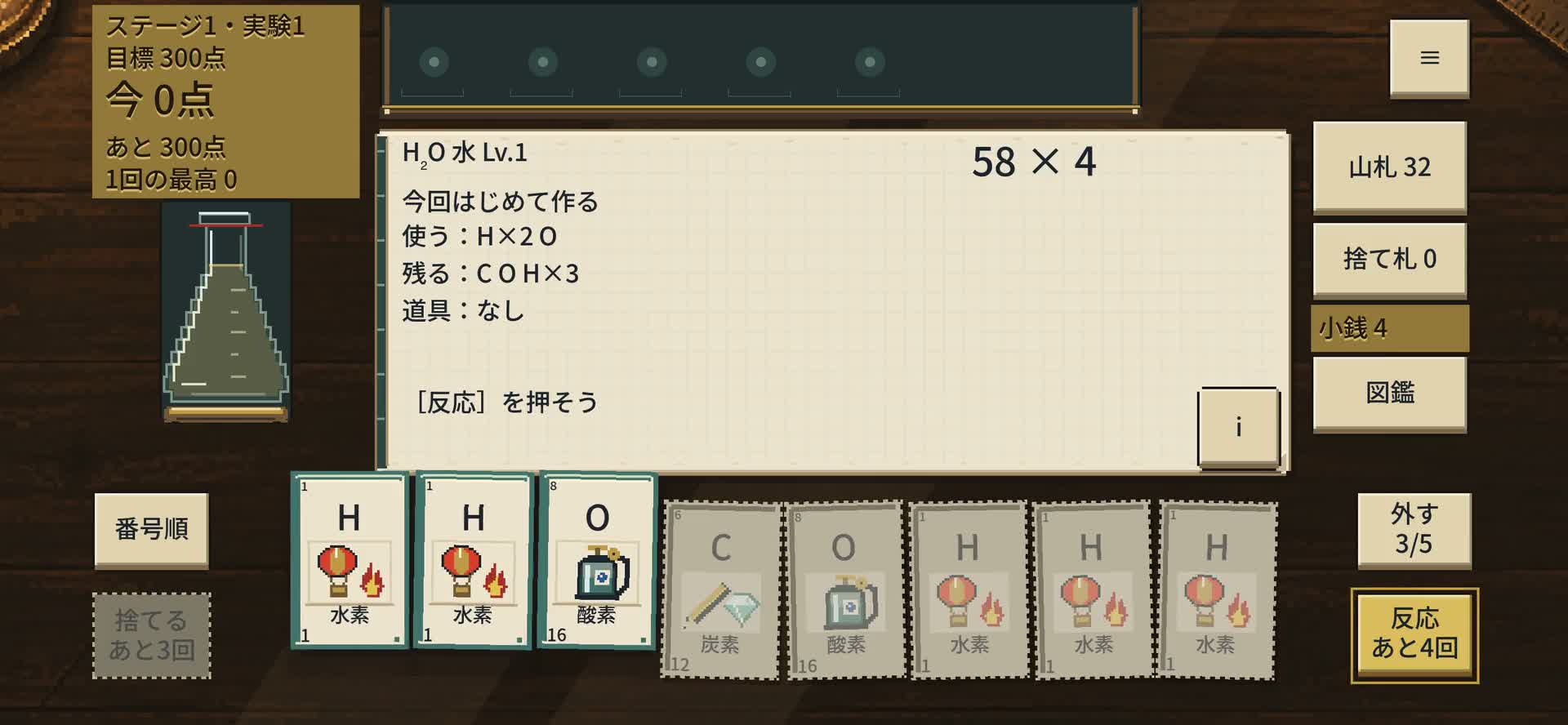
The introductory experiment restricts your selection to water. In ordinary experiments, you can pursue other compounds and set combinations.
2. The 58 × 4 preview and the first 312 points
The preview is water's base points and multiplier. With ordinary cards, a level 1 compound and no tools, each H contributes 1 point and O contributes 16. Water adds a 40-point compound bonus: 1 + 1 + 16 + 40 = 58.
The first time you make a particular compound in the current run, another 20 points are added before multiplication. The screenshot's 「今回 はじめて作る」 line flags that bonus.
18 card points + 40 water bonus + 20 first-in-run bonus
78 × 4 = 312 points
This exceeds the introductory target of 300 in one reaction. Make water again in the same run under otherwise identical conditions and the result is 58 × 4 = 232 points. This bonus tracks the current run, independently of whether water was already discovered in your collection.
Tools, enhanced cards, compound levels and the elements held for your final reaction can change the result. Watch what is added during scoring rather than treating the base preview as the final score.
These are game scoring values. The recipes describe matching element cards to a formula, not a procedure or yield for a real chemical reaction.
3. Plan the cards you keep and the tools you buy
Read “Left” as well as “Using”
Water uses two H cards and one O. Hydrogen peroxide H₂O₂ needs one more O. A higher immediate score can use up an element you wanted for the next reaction. Check your remaining target and reactions, then consider which combinations your remaining cards could support.
In ordinary experiments, you can also discard selected cards to replace them. Discards are limited: decide which combination to keep before spending one.
Choose tools whose conditions fit your deck
After a successful experiment, the shop lets you spend in-game coins on tools, recipes and packs. Select an item to read it before confirming the purchase. The screenshot is one example; the stock changes between runs.
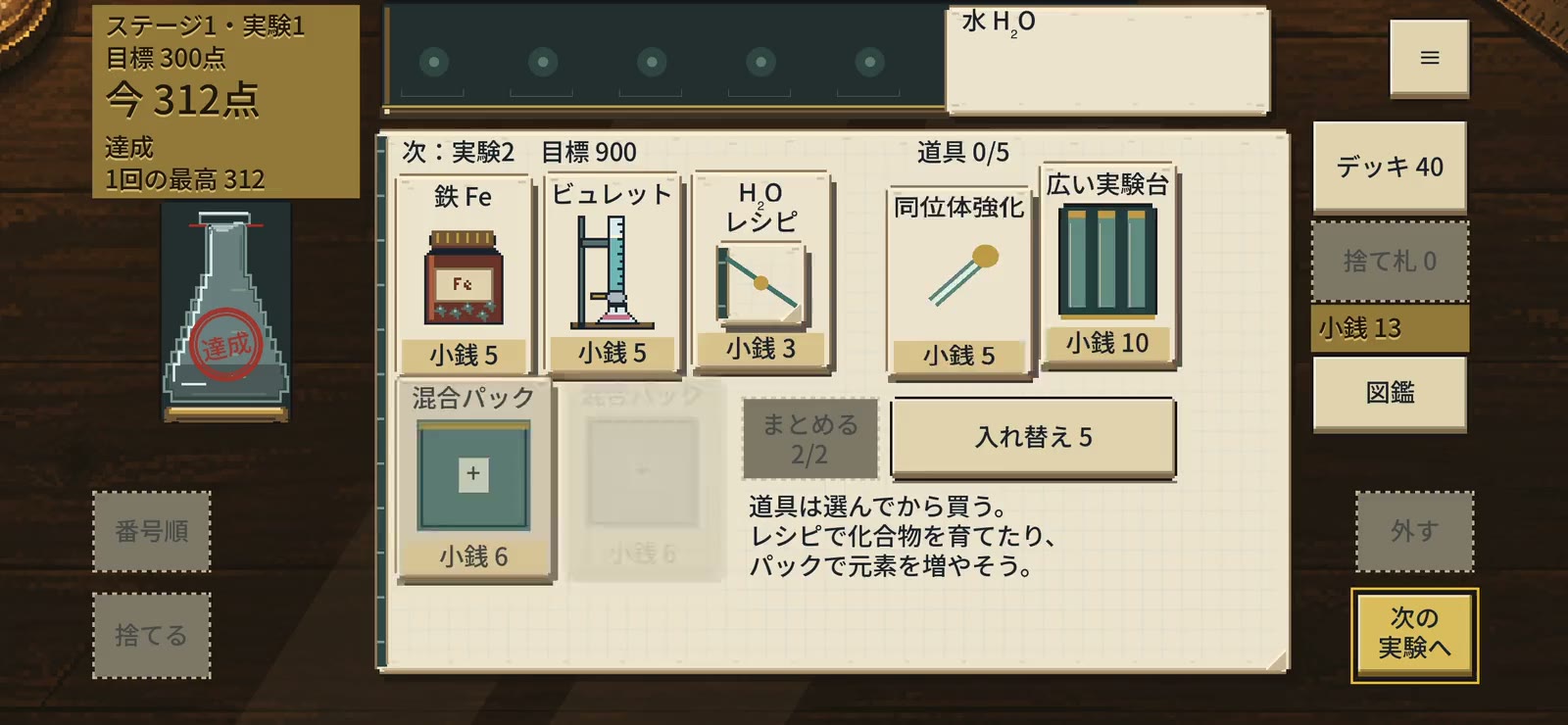
For example, Hydrogen Tank adds 10 points for each H card you play. Consider it if your deck often makes H-containing compounds. Iron, shown in the screenshot, adds 80 points per played card with atomic number 20 or greater. H and O do not meet that condition, so Iron does not add points to an ordinary water hand. Read the condition, not just the tool's name.
Recipes raise compound levels; packs add cards or other items. Decide whether to strengthen a compound you can make regularly or broaden your options.
Compare eight recipes and their first-in-run and repeat scores →
4. Return using the same browser
The browser game saves progress locally in that browser. To continue, return on the same device, in the same browser and using the same launch method. Progress is not shared with the iPhone app.
Landscape orientation is recommended on phones. The home-screen guide explains installation. The PWA still needs an internet connection, and a Safari tab and a home-screen PWA may have separate saves.
If the game will not load or a save seems missing, see browser support. Do not clear site data while looking for a save: that removes locally stored progress.
About this guide
9 October 2026: added the water walkthrough, scoring example, shop decisions and browser save guidance. Screenshots come from gameplay recorded on a Mac, not an iPhone. The numbers were checked against the current game data and scoring implementation.
If a result differs, include the selected cards, tools and compound level when contacting support.